
Need Your CCTV System Configured Properly?
- ✓ Free site survey
- ✓ Professional installation
- ✓ WhatsApp us for a same-day quote
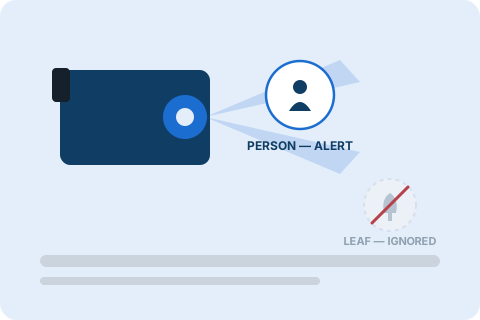
Even with "AI" in the name, most security cameras ship with settings tuned for maximum sensitivity — which means maximum noise. The good news: most false alarms are fixable in under 15 minutes, without buying new hardware.
This guide walks through exactly why false alarms happen and the settings that actually stop them, including a few things that matter more in Abu Dhabi's climate than in a typical buying guide written elsewhere.
Why AI cameras still send false alarms
AI doesn't remove false alarms automatically — it only helps once it's configured correctly. Most false alerts come from five common causes:
- Environmental motion — wind-blown trees, rain, insects near night-vision LEDs, moving shadows
- Oversized detection zones — the camera is watching areas you don't actually care about (a sidewalk, a neighbour's yard, open sky)
- Sensitivity set too high — the camera reacts to small pixel changes instead of real objects
- Object filters left off — the camera alerts on "any motion" instead of specifically people or vehicles
- Poor camera placement — glass reflections, headlights, or direct sunlight confusing the sensor
Industry data consistently shows unfiltered motion detection produces false positive rates of 80% or higher, while a properly tuned AI system can bring that below 5%. The gap between those two numbers is almost always in the settings.
Step 1: Set detection zones first
Before touching sensitivity, draw zones that cover only what matters — a driveway, front door or gate. Exclude trees, the street and neighbouring properties. This single change eliminates the majority of nuisance alerts for most users, because the camera stops evaluating motion it was never meant to care about.
Step 2: Turn on person/vehicle filters
Almost every camera released in the last two years includes AI object classification — the ability to tell a human shape from a swaying branch or a cat. Make sure this is switched on and set to alert only for person and vehicle, not "any motion." This is the single biggest lever for cutting false alarms, since it filters out animals, insects and environmental noise at the source. Cameras like the Imou Cruiser Dual 2 include this AI filtering built in.
Step 3: Tune sensitivity to the location
| Location type | Recommended sensitivity | Why |
|---|---|---|
| Entry points (doors, gates) | High (60–80%) | You want to catch everything real, close range |
| Driveways | Medium (40–60%) | Balance of coverage and noise |
| Open yards / long driveways | Low (20–40%) | Distant motion is less reliable and more often environmental |
A good starting point is 40–60% overall, then adjust based on a few days of real alerts.
Step 4: Account for weather and light
- Rain, wind and dust cause spikes in false alerts — narrow zones and enable weather-aware filtering if your system supports it
- Avoid pointing cameras directly at rising/setting sun or headlights; if unavoidable, choose a camera with strong WDR (Wide Dynamic Range)
- Clean camera housings regularly — dust and condensation are a common, overlooked cause of false triggers, especially after a sandstorm
Step 5: Test, log and adjust
Don't set it and forget it. Run the system for 48–72 hours, review every alert, and note the cause. Adjust one setting at a time — zones, then sensitivity, then filters — so you know what actually worked. Revisit settings again after seasonal changes, since foliage and lighting shift throughout the year.
Quick reference checklist
Detection zones drawn
Cover only relevant areas — exclude trees, street and neighbouring property.
Person/vehicle filters enabled
Not left on "any motion."
Sensitivity matched to location
Higher at entries, lower at open areas.
Camera placement checked
Avoids glare, direct sun and reflections.
Housing and lens cleaned
Especially after dust or sandstorms.
48–72 hour test period completed
Every alert reviewed and logged.
Settings reviewed each season
Foliage, sun angle and weather all shift through the year.
If you'd rather have this configured professionally the first time, our CCTV installation service in Abu Dhabi includes zone and sensitivity calibration as standard, and our CCTV maintenance plans re-check these settings seasonally.
📋 Free AI Camera Setup Checklist
A printable version of the checklist above, plus brand-specific steps for Ring, Nest, Reolink, Hikvision and generic NVR systems.
Frequently asked questions
Most likely the object filter is set to "any motion" instead of "person" or "vehicle". Environmental movement still counts as motion — AI only ignores it once classification filters are switched on.
Under 5% is considered well-tuned. Untuned systems relying on basic pixel-based motion detection commonly run at 80% or higher.
In most cases, settings — not hardware — are the problem. Detection zones, sensitivity and person/vehicle filters solve the majority of false alerts on cameras already installed.
At minimum once per season, since wind, foliage growth and sun angle all change throughout the year and can reintroduce false alerts.
Yes. Blowing dust, sandstorm haze, insects near IR illuminators at night and heat shimmer off pavement all commonly trigger basic motion sensors. Person/vehicle AI filters and correctly sized zones reduce this significantly.
Not if it's paired with zones and object filters. Lowering blanket sensitivity alone can miss real events at a distance, which is why entry points should keep higher sensitivity while open, low-priority areas use lower sensitivity.
Questions & comments
Have a specific question about your camera brand or property? Our engineers reply within one business day.
Cut our alerts from over 40 a day to about 3. The person/vehicle filter made the biggest difference by far.
That matches what we see on most installs — zones plus object filters solve the vast majority of cases. Glad it worked for your setup.